
1. Add the ASINs
Paste a list or upload a CSV — your own listings and the competitors you benchmark against, hundreds at a time.
Amazon shows today’s rank and keeps no history. Every daily check here stores the main-category and sub-category rank beside the price, Buy Box and stock recorded on the same visit.
Amazon shows a listing’s Best Sellers Rank exactly once: the number it happens to hold at the moment you open the page. It keeps no history, and the number moves all day. The AMZ Selling Tools BSR tracker reads the live product page for the ASINs you choose, once a day, and stores the rank it finds — so after a week you have a line instead of a snapshot, and after a quarter you have a season.
The tracker stores the main and sub-category rank on every check, in four columns that mirror how the product page words it:
Two rank slots are kept per check. When the page shows no rank at all — a new listing, or a category that carries none — the cells are left empty rather than filled with a guess, so a rank disappearing is itself part of the record.
The rank is never stored on its own. It lands in the same row as everything else read on that visit: price, list price and any deal or coupon, the Buy Box winner and the other sellers, stock wording, the delivery promise, rating and review count — 92 columns in all. That is the difference between knowing a listing slipped and knowing why.
Paste a list or upload a CSV — your own listings and the competitors you benchmark against, hundreds at a time.
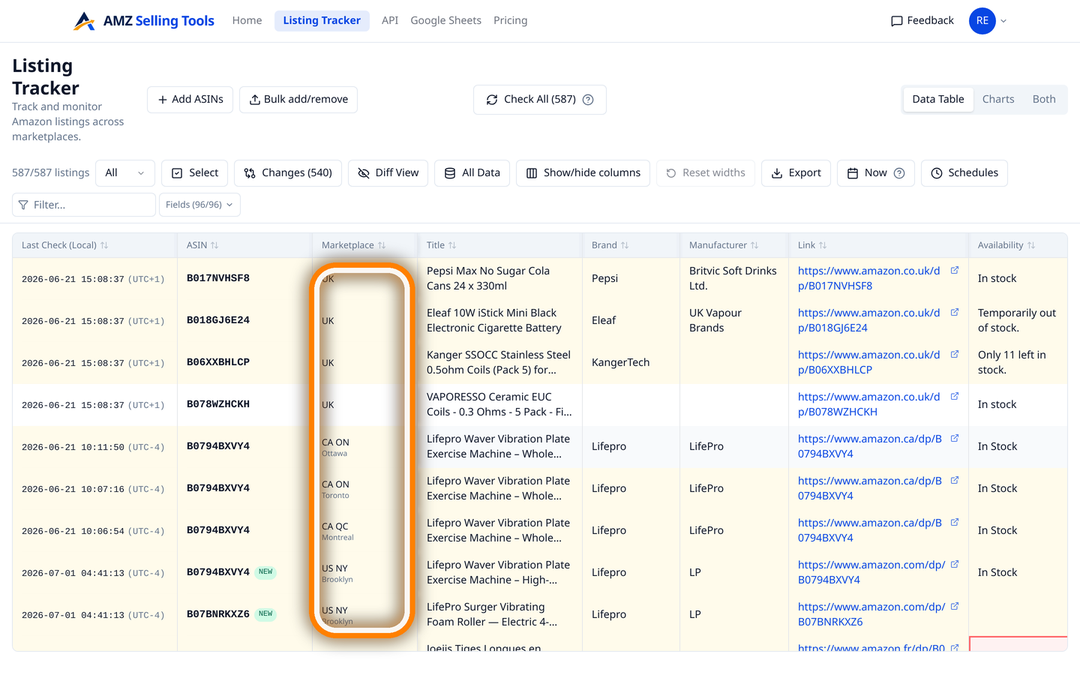
Rank is per marketplace, so add the ASIN once for each of the 12 stores you sell in. In the US and Canada you also choose the city.
Every tracked row is checked once a day, overnight in the marketplace's local time, at a start time you set. Need a reading now? Run a check on demand.
Click a rank cell for a dated timeline of every value recorded. Changes narrows the table to what moved, Diff View highlights old against new, and the date picker rewinds to any past day.
An alert is one field and one condition on the rows you choose. Because BSR is stored as a number, both rank columns take the five numeric conditions: changed, increased, decreased, drops below and rises above. The category labels are text, so they take changed, becomes, contains and stops containing — which is how you hear about Amazon re-categorising a listing.
Alerts arrive by email, either after every check or as one daily summary once the day’s last scheduled check has finished. They fire on the transition rather than on the state, so a threshold crossed on Monday does not email you again every night it stays crossed. A rule also needs a value on both sides of the comparison: a rank that appears for the first time, or vanishes, shows up in the history rather than in your inbox.
The record is yours to take out, on every plan and with no add-on:
bsr_1, bsr_1_category, bsr_2 and bsr_2_category straight into your own warehouse or notebook.Twelve Amazon marketplaces — the United States, United Kingdom, Germany, France, Italy, Spain, Poland, Sweden, the Netherlands, Belgium, Canada and Australia — and 22 shopper locations. The United States is checked from Brooklyn, Chicago, Dallas, Los Angeles, Denver and Miami Beach; Canada from Toronto, Ottawa, Montreal, Calgary, Edmonton and Vancouver; each of the other ten countries from one location in-country.
Every Amazon store ranks its own catalogue in its own category tree, so the same ASIN carries a different rank on amazon.com, amazon.co.uk and amazon.de — track it once per marketplace to compare them. Within a single store the rank itself has not varied by city in our checks, but the price, Buy Box winner and delivery date recorded beside it certainly do, which is the reason to pick the city that matches the customers you care about. Keepa, for comparison, covers 11 marketplaces and none of amazon.nl, .se, .pl, .com.be or .com.au; our comparison with Keepa sets out the rest of the trade-offs.
It costs a flat $0.1347 per ASIN per month ($0.00449 per check): 30 daily checks, all 92 columns, alerts, CSV, Google Sheets and the API included, so fifty ASINs come to $6.73 a month. There is no per-feature upsell and no seat pricing. Every new account starts with a free 30-day trial of up to 10 products and 10 checks a day, with no card required.
Rank tells you how a listing compares. To find out what moved it, pair it with Buy Box and seller tracking and with listing monitoring for title, image and content changes. Our guide to tracking Amazon BSR history daily covers how to read the resulting series, and the “bought in past month” badge gives you the rough unit count beside it.
Once a day for every tracked ASIN, on a schedule you set per marketplace, plus an on-demand check whenever you want a reading right now. Each check stores the rank alongside the other columns read from the same page.
Yes. Two rank slots are stored on every check: BSR #1 with its category label, and BSR #2 — the first sub-category rank Amazon lists — with its own label.
No. The history starts on the day you add the ASIN, because every reading comes from the live product page rather than from a database of past values. Keepa is the tool to use when you need years of back-history.
Yes. Rank fields take the numeric conditions changed, increased, decreased, drops below and rises above, so a rule such as “BSR #1 rises above 5000” emails you when a listing falls out of range. Alerts arrive after each check or as one daily summary.
Yes. Every marketplace ranks its own catalogue in its own category tree, so track the ASIN once per marketplace to compare them. Within a single store, the rank itself has not varied by city in our checks.
A flat $0.1347 per ASIN per month ($0.00449 per check), which covers 30 daily checks, with alerts, CSV, Google Sheets and API export included. New accounts get a free 30-day trial of up to 10 products and 10 checks a day, with no card.
One price per check, whether it tracks an ASIN, scans a keyword line or brings in new reviews — no volume games, no add-ons. Every new account starts with a free 30-day trial (10 products, checked daily, no card), and one-time credit packs never expire.
A fraction of Keepa (€29/mo) or Helium 10 (from $99/mo). See how we compare: vs Keepa · vs Helium 10