
1. Your key already exists
Every verified account has a personal API key. There is no plan gate and nothing to request — the script you copy comes with it filled in.
Copy one Apps Script into your own spreadsheet and an AMZ Selling Tools menu appears. It imports the latest check for every tracked listing, the full history, or your keyword ranks into tabs you own.
Most people who track Amazon listings end up in a spreadsheet anyway — that is where the margin formula lives, where the buyer’s list is, and where the weekly report gets built. So AMZ Selling Tools puts the data there directly: one Apps Script pasted into your own spreadsheet, and a menu that imports every tracked listing into a tab. No add-on to install, no Google Cloud project, no connector to buy.
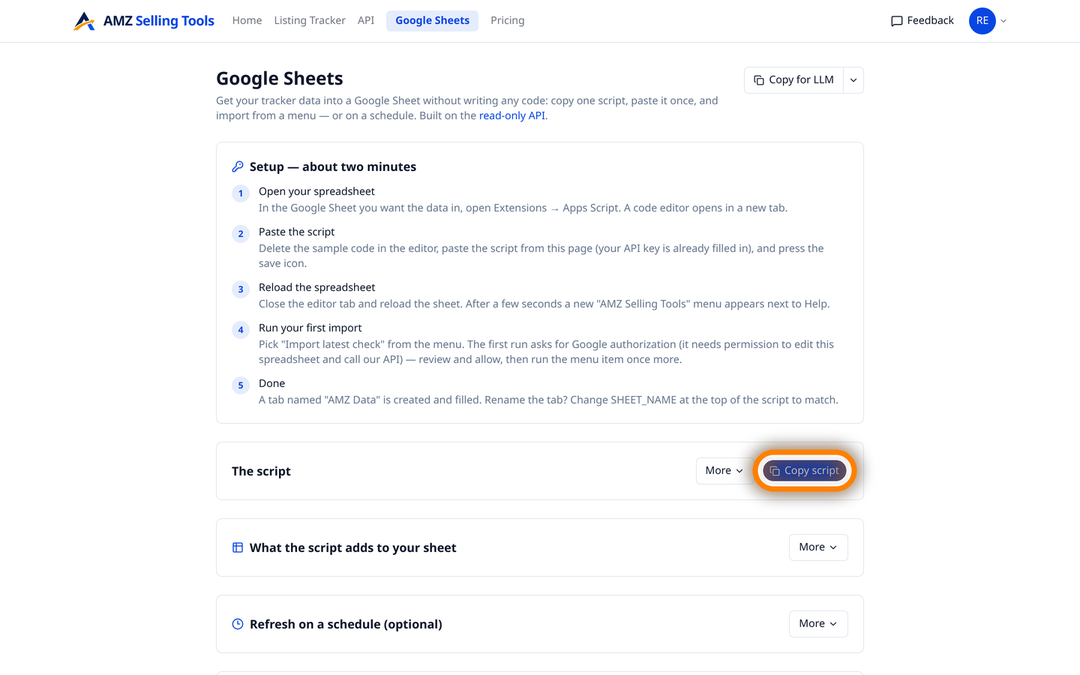
The script runs inside your spreadsheet and calls your own API key. Setup takes about two minutes:
Nothing on our side connects to Google. There is no OAuth grant to us, no shared document and no third-party access to your Drive: the only authorisation in the whole flow is the one Google itself asks for, inside your own spreadsheet, for a script you pasted there.
The menu offers six imports in three tabs, and they answer different questions. The first two write your listings to “AMZ Data”, the next two write your keyword ranks to “AMZ Keyword Ranks”, and the last two write your reviews to “AMZ Reviews”.
Values are matched to the header names in row 1, so a sheet you have already arranged keeps its column order; any field the sheet has no column for is added at the end rather than dropped. Each import is written below what is already there, separated by a blank row — the script appends, it never clears your sheet, so yesterday’s import stays where it is and the file grows into a series.
The available columns are the same 92 the API documents, in eleven groups: identity, product, ranking, ratings, availability, pricing, sellers, content, media, details and the error column that records a check that could not be completed. In practice that means price, list price and sale price, deal and coupon fields, the Buy Box winner and the top three offers with their fulfilment types and prices, the availability line, delivery dates and fee, both Best Sellers Rank slots, rating, review count, the “bought in past month” figure, the title, bullets and image URLs — each row stamped with the ASIN, the marketplace, the location and the time of the check.
Every verified account has a personal API key. There is no plan gate and nothing to request — the script you copy comes with it filled in.
Extensions, then Apps Script, then paste and save. It is one file of plain Apps Script — readable, editable and yours.
Latest check for a working sheet, full history for analysis. Both write into an AMZ Data tab in the spreadsheet you ran them from.
A time-driven trigger in Apps Script runs the import each morning, so the sheet fills itself with your laptop shut.
The import is a menu item until you schedule it, and scheduling is Google’s job rather than ours — which is why it is worth doing deliberately. In the Apps Script editor, open Triggers, add a trigger for the import function, choose Time-driven, a Day timer, and an hour that sits comfortably after your checks have finished. Checks run overnight in each marketplace’s local time, so an early-morning window is the usual choice. Google may ask for authorisation once more; after that the import runs on its own, every day, with nothing open on your machine.
Because imports append, a daily trigger gives you a dated block per day rather than a sheet that overwrites itself. If you would rather keep one flat current view, run the latest-check import into a fresh tab, or clear the tab before the run — the script writes wherever its sheet-name constant points.
Say you follow forty competitor ASINs in two US cities — eighty tracked rows. You add them once, set the daily schedule, and add a trigger for 07:00. Each morning the sheet gains eighty rows carrying yesterday’s price, the Buy Box winner, the availability line, the delivery date each city was promised and both rank slots. A pivot on the ASIN column gives you a price-by-day matrix; a filter on the availability column gives you every rival that went out of stock this week; a chart on the rank column gives you the line Amazon does not keep. At $0.00449 a check, eighty rows cost $10.77 a month, and the spreadsheet is entirely yours — formulas, tabs, sharing and all.
A sheet is not the only way out. Export the tracker to CSV, TSV or a plain text file: the columns you have on screen, in the order you have them, for the rows you have selected, with the full check-by-check history rather than just the latest reading. You can narrow an export to one marketplace or to checks before a given date, and timestamps come out in your own timezone. It is the right tool for a one-off hand-off to a client or an accountant, where a live connection would be overkill.
Underneath both routes is the account’s REST API, and you are welcome to use it directly — the Apps Script is simply the friendliest client for it. A personal key goes in an Authorization: Bearer header. The listing endpoints only read: seven GET endpoints cover the account, the marketplaces, the column dictionary, your tracked ASINs, the latest snapshot per listing, the full snapshot history and the history for a single ASIN; they return JSON, change nothing, and the same 92 columns are documented field by field with types and examples. The same key also manages your keyword lines, where creating a line or triggering a check spends credits, so keep it private. Rate limits are published: generous on the light endpoints, and per-minute, per-hour and per-day ceilings on the history ones. Power BI, a Python notebook, a cron job on your own server — anything that can send a header can read it.
Both the Sheets connection and the API are included on every plan and during the trial. There is no data add-on, no export tier and no per-seat charge: if a column is on your screen, it is in your sheet.
Tracking is a flat $0.1347 per ASIN per month ($0.00449 per check): 30 daily checks of all 92 columns across 12 marketplaces and 22 shopper locations, with alerts, CSV, Google Sheets and the API included, so fifty listings come to $6.73 a month. Every new account starts with a free 30-day trial of up to 10 products and 10 checks a day, with no card required, and the Sheets connection works during the trial exactly as it does afterwards.
Open your spreadsheet, use Extensions then Apps Script, paste the script from your account’s Google Sheets page and save. Reload the sheet and a new menu appears with six imports: the latest check or the full history of your listings, the latest keyword ranks or their last 30 days, and the new reviews of the last 7 days or your review lines.
Once you add a time-driven daily trigger in Apps Script, yes — Google runs the import each morning with nothing open on your machine. Out of the box the import is a menu item you run yourself.
No. Each import is appended below the existing rows with a blank separator row, into three tabs — AMZ Data for your listings, AMZ Keyword Ranks for your keyword ranks and AMZ Reviews for your reviews — and values are matched to the header names already in row 1.
Neither. It is one Apps Script file inside your own spreadsheet, and the only authorisation involved is the one Google asks you for the first time you run it. We hold no access to your Drive.
All 92 documented columns, in eleven groups spanning identity, product, ranking, ratings, availability, pricing, sellers, content, media and details — price, Buy Box, stock, delivery, rank, reviews, images and the rest.
Yes. The same script imports your keyword lines into the AMZ Keyword Ranks tab: the latest rank of every keyword and ASIN with the previous run’s rank beside it, or the last 30 days of history. Add a daily trigger and the tab keeps a running record of where each ASIN ranks, beside your listing data in the same spreadsheet.
No. CSV export, the Google Sheets connection and the API are included on every plan and during the trial, at no charge beyond the flat $0.1347 per ASIN per month ($0.00449 per check).
One price per check, whether it tracks an ASIN, scans a keyword line or brings in new reviews — no volume games, no add-ons. Every new account starts with a free 30-day trial (10 products, checked daily, no card), and one-time credit packs never expire.
A fraction of Keepa (€29/mo) or Helium 10 (from $99/mo). See how we compare: vs Keepa · vs Helium 10