
A daily check, on your schedule
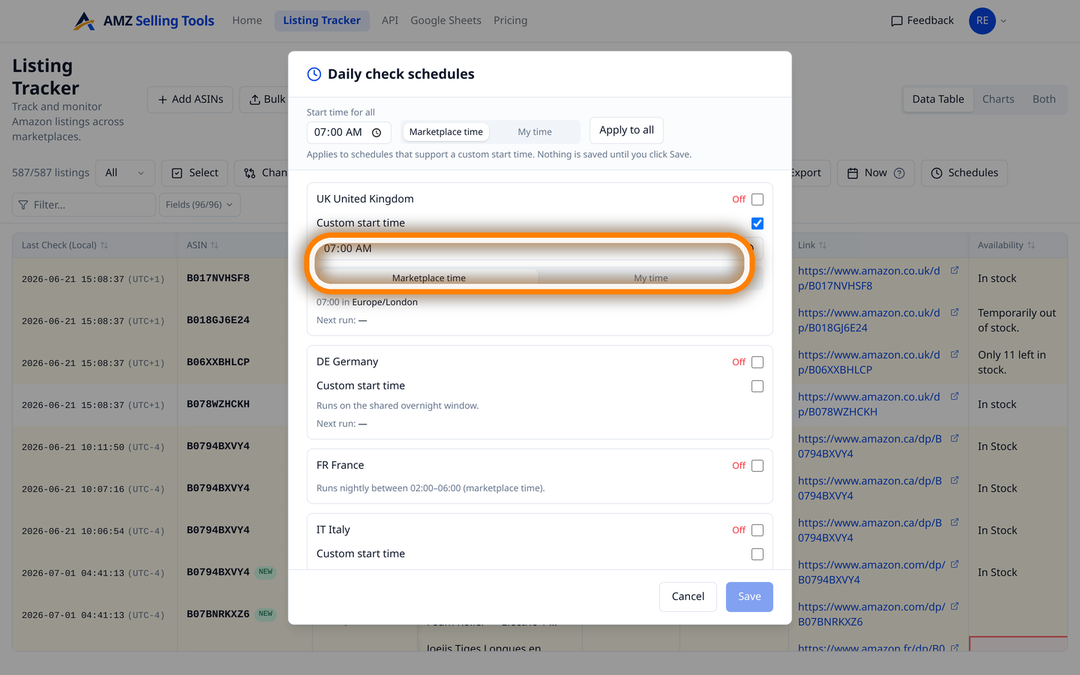
Every tracked listing is read once a day, overnight in the marketplace's local time. You set the start time per marketplace, and you can run a check on demand whenever you need the page as it is right now.
A listing is a shared catalogue record that Amazon and every other seller can change without telling you. One daily check per listing, 80 fields compared, and an email when the ones you care about move.
An Amazon listing is a shared catalogue record, not a page you own. Amazon edits it, other sellers contribute to it, and offers appear on it — none of which generates a notification. The title you wrote in March can read differently in June, your main image can be swapped by a contribution you never saw, and a reseller can be under your Buy Box by the weekend. AMZ Selling Tools reads each listing you track once a day and keeps a dated record of what changed and when, for your own ASINs and your competitors’ alike.
Every check reads the live product page — the page a shopper sees — and stores 92 columns from it. The groups that matter most for monitoring:
Amazon’s own tools cover the catalogue you sell on, which is the right place to contest an edit to your own listing. They leave three gaps for anyone competing on a marketplace, and those gaps are what this fills: a competitor’s title change, image swap or new coupon never appears there; who holds the Buy Box, which sellers are on the listing and what the delivery promise reads are properties of the live page rather than of the data you submitted; and none of it is shown from the shopper’s location. A tracked row here is one ASIN in one location, so a competitor’s ASIN costs exactly what one of your own does.
Every tracked listing is read once a day, overnight in the marketplace's local time. You set the start time per marketplace, and you can run a check on demand whenever you need the page as it is right now.
Each check is compared with the previous one field by field. Rolling values — the delivery dates, the order-within countdown and the listing badge — are stored but never flagged, because they move every day on their own.
One field, one condition, one email. Presets cover the common cases: Buy Box winner changed, Availability changed, Price drops below, Rating drops below.
CSV or TSV download, a Google Sheet that refreshes itself from one copied Apps Script, or a personal API key. Included on every plan.
The table shows the most recent check. Four controls turn it into a history you can interrogate:
An alert is one field, one condition, and the listings you apply it to. Every field compared from one check to the next can raise one except the listing’s own URL — 79 in all. Text fields such as Title, each bullet point and the full bullet list, Description, the A+ copy and A+ images, all ten image slots, Buy Box, Seller 1 and Availability take changed, becomes, contains and stops containing, so “All Bullets stops containing” a claim you rely on is a single rule. The flags — Has Coupon, Has Deal, Has Video and the Prime badge — take turned on and turned off. Numbers such as price, rating, review count, the offers count and both rank slots take drops below, rises above, increased and decreased. Emails arrive after every check, or as a single daily summary once the day’s last scheduled check has finished.
Three limits, stated up front rather than discovered later. The rolling values — the delivery dates, the order-within countdown, the holiday delivery message and the listing badge — are stored but never compared, so they cannot raise an alert. A rule needs a value on both sides of the comparison, so a field appearing on a listing for the very first time is written to the history rather than emailed; for the same reason, where Premium A+ bakes its wording into images and the A+ text stays empty, put the rule on A+ Images instead. And there is no dedicated hijacker alert, because Amazon exposes nothing that reliably identifies one; what exists is the record of who is on the listing, and alerts on the Buy Box winner, the sellers and the offers count changing.
Twelve marketplaces — the United States, United Kingdom, Germany, France, Italy, Spain, Poland, Sweden, the Netherlands, Belgium, Canada and Australia — and 22 shopper locations. The United States is checked from Brooklyn, Chicago, Dallas, Los Angeles, Denver and Miami Beach, Canada from Toronto, Ottawa, Montreal, Calgary, Edmonton and Vancouver, and each of the other ten countries from one location in-country. Because Amazon builds the page for the shopper, stock wording, delivery dates and sometimes the winning offer differ between them.
Monitoring costs a flat $0.1347 per ASIN per month ($0.00449 per check) — 30 daily checks of all 92 columns, alerts, CSV, Google Sheets and API included — so fifty listings come to $6.73 a month. Every new account starts with a free 30-day trial of up to 10 products and 10 checks a day, with no card required.
Each daily check compares 80 fields with the previous one: title, bullet points, description, A+ content and images, the ten image slots, price and promotions, Buy Box and sellers, availability, rank and reviews.
Yes. A tracked row is one ASIN in one location, so a competitor’s ASIN costs the same as one of your own and is monitored in exactly the same way. Most people track both side by side.
After the check that recorded it. Every listing is read once a day, overnight in the marketplace’s local time, and alert emails go out after that check or as one daily summary. An on-demand check gives you the page as it is right now.
No. The delivery dates, the order-within countdown and the listing badge are stored on every check but never flagged as changes, because they roll forward on their own and would otherwise make every listing look changed every day.
Yes. Each of the five bullet points and the full bullet list can raise an alert, and so can the A+ copy, the A+ images, the Brand Story flag and images two to ten — 79 alertable fields, every compared field except the listing’s own URL. They take the text conditions changed, becomes, contains and stops containing. Where Premium A+ bakes its wording into images the A+ text stays empty, so put that rule on A+ Images instead.
A flat $0.1347 per ASIN per month ($0.00449 per check) for 30 daily checks of all 92 columns, with alerts, CSV, Google Sheets and API export included. New accounts get a free 30-day trial of up to 10 products and 10 checks a day, with no card.
One price per check, whether it tracks an ASIN, scans a keyword line or brings in new reviews — no volume games, no add-ons. Every new account starts with a free 30-day trial (10 products, checked daily, no card), and one-time credit packs never expire.
A fraction of Keepa (€29/mo) or Helium 10 (from $99/mo). See how we compare: vs Keepa · vs Helium 10