
1. Build the set
Paste competitor ASINs, or upload a CSV of up to 500 rows with the marketplace on each one. Duplicates are skipped, and adding a listing is free — only checks are billed.
Any ASIN can be tracked, not only the ones you sell. Each daily check records a rival’s price, stock wording, Buy Box winner, the other offers and the delivery promise from the location you choose.
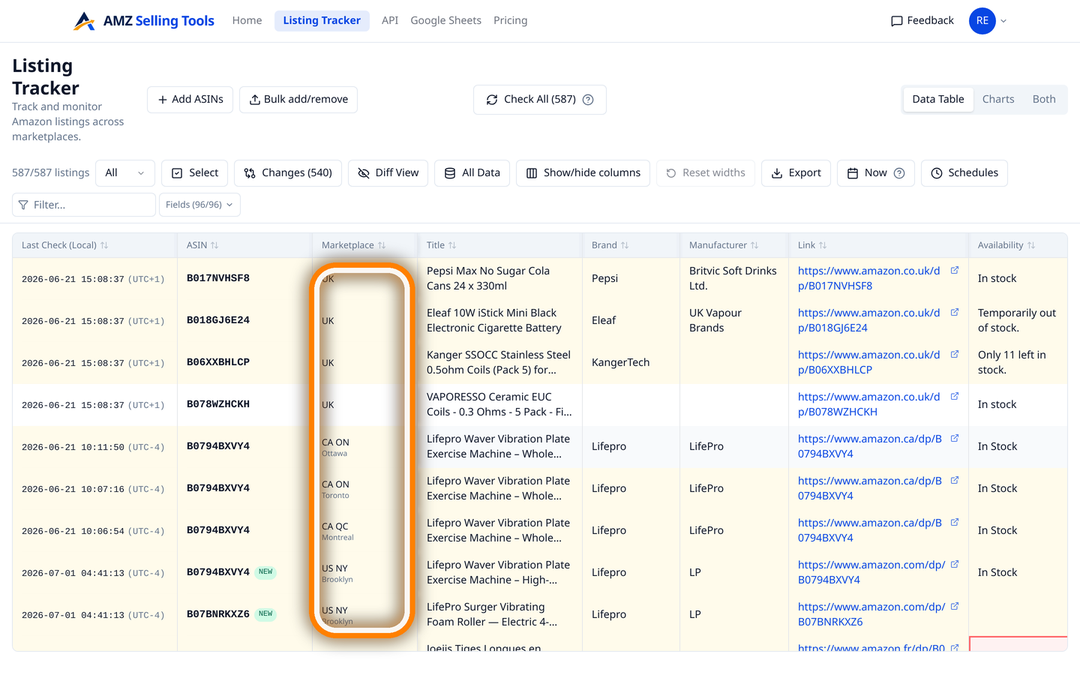
Most of what you need to know about a competitor is on their product page, and none of it is kept. Their price today, who is winning their Buy Box, whether they have gone out of stock, what delivery date a shopper in Dallas is being promised — all of it renders once and is replaced tomorrow. AMZ Selling Tools reads the listings you nominate once a day and keeps the answers, dated. It tracks any ASIN, not only your own, at the same flat price per listing.
There is no integration to authorise and no credentials to hand over. A check is an ordinary request for the public product page — the same URL a shopper opens — from a specific marketplace and delivery location. Nothing is submitted on your behalf, no seller identity is attached to the request, and the tracker never touches Seller Central or a seller API.
Two consequences follow. A competitor’s ASIN costs exactly what one of your own does, because the tracker cannot tell them apart: everything it knows comes off the page. And you can track a product you do not sell, in a category you are researching or a marketplace you have not entered yet.
Each check stores 92 columns from the live page. The ones that matter when the listing belongs to someone else:
It all lands in one row with one timestamp, which is the point: a price cut read next to the stock line, the Buy Box winner and the delivery date from the same visit.
Paste competitor ASINs, or upload a CSV of up to 500 rows with the marketplace on each one. Duplicates are skipped, and adding a listing is free — only checks are billed.
Each ASIN is tracked per location: six US cities, six Canadian cities, and one location in each of the other ten marketplaces.
Every row is read once a day, overnight in the marketplace's local time, at a start time you set — plus an on-demand check when you want the page as it is now.
Rules on price, stock, Buy Box or rating email you after the check that recorded the change, or in one daily summary.
Amazon builds the product page for the shopper in front of it, so a single reading is a reading from one place. The delivery date differs, stock wording differs, and because delivery is understood to feed the featured offer, the Buy Box winner can differ too. A rival who looks unbeatable from your desk may be losing the featured offer two states away.
The United States is checked from Brooklyn, Chicago, Dallas, Los Angeles, Denver and Miami Beach; Canada from Toronto, Ottawa, Montreal, Calgary, Edmonton and Vancouver; the United Kingdom, Germany, France, Italy, Spain, Poland, Sweden, the Netherlands, Belgium and Australia from one location each — 22 locations across the 12 marketplaces. Each ASIN-and-location pair is its own row with its own daily history, so the same competitor tracked in three cities gives you three columns of answers side by side. Our guide to competitor prices, stock and delivery by ZIP code works through why the page changes and how to choose the locations worth paying for.
Adding listings is free and uses no checks, so a set can start wide. Two ways in:
asin, marketplace and an optional action column handles up to 500 rows at a time, which is the tidy way to move a competitor list out of a spreadsheet. The action column also lets you stop tracking a row while keeping its history, or delete it and its history outright.Pairs you already track are skipped rather than duplicated, so re-uploading a longer list is safe.
An alert is one field, one condition and the rows you apply it to. Four presets cover the usual cases — price drops below, rating drops below, availability changed, Buy Box winner changed — and 79 of the 80 compared fields can carry a rule of their own, everything but the listing’s URL. Text fields take changed, becomes, contains and stops containing; numbers take drops below, rises above, increased and decreased; flags such as Has Coupon and Has Deal take turned on and turned off.
Emails arrive after every check, or as one daily summary after the day’s last scheduled check. Three limits, stated up front: the delivery dates and the order-within countdown are recorded but cannot raise an alert, because they roll forward on their own every day; a rule compares a value with the previous one, so a field appearing for the very first time is written to the history rather than emailed; and there is no “hijacker alert” here, because Amazon exposes nothing that reliably identifies one. What you get instead is the dated record of who is on the listing, and alerts when the Buy Box winner, a seller’s name or fulfilment type, or the offers count changes. The Buy Box tracker covers that side in detail.
Take the record with you: CSV or TSV of the columns you have on screen for the rows you select, including the full check-by-check history; a Google Sheet fed by one copied Apps Script; or a personal API key. All three are included on every plan.
Tracking costs a flat $0.1347 per ASIN per month ($0.00449 per check) — 30 daily checks of all 92 columns — and a competitor’s listing is billed exactly like one of your own, so fifty listings come to $6.73 a month whoever sells them. Keepa, for comparison, covers 11 marketplaces without amazon.nl, .se, .pl, .com.be or .com.au; our comparison with Keepa sets out where a live listing tracker and a price-history database do different jobs. Every new account starts with a free 30-day trial of up to 10 products and 10 checks a day, with no card required.
No. The tracker reads the public product page, the same one a shopper opens, so there is nothing to connect and no seller credentials involved. Any ASIN can be tracked, including in marketplaces you do not sell in.
Nothing is sent to the seller, and the check carries no seller identity — it is an ordinary request for a public page from a shopper location. We can speak for what we do, not for what Amazon records internally.
Price, list and sale price, deal and coupon wording, the Buy Box winner, the top three offers with fulfilment type, condition and price, the offers count and who dispatches, the availability line, delivery dates and fee, both rank slots, ratings and the bought-in-past-month figure.
Yes. Each ASIN and location pair is its own row with its own daily history at the same flat price, across six US cities, six Canadian cities and one location in each of the other ten marketplaces.
Paste a list and pick the marketplaces, or upload a CSV or TSV of up to 500 rows in one go. Adding listings is free and uses no checks, and pairs you already track are skipped rather than duplicated.
The same as one of your own listings: a flat $0.1347 per ASIN per month ($0.00449 per check) for 30 daily checks of all 92 columns, alerts and export included. New accounts get a free 30-day trial of up to 10 products and 10 checks a day, with no card.
One price per check, whether it tracks an ASIN, scans a keyword line or brings in new reviews — no volume games, no add-ons. Every new account starts with a free 30-day trial (10 products, checked daily, no card), and one-time credit packs never expire.
A fraction of Keepa (€29/mo) or Helium 10 (from $99/mo). See how we compare: vs Keepa · vs Helium 10